
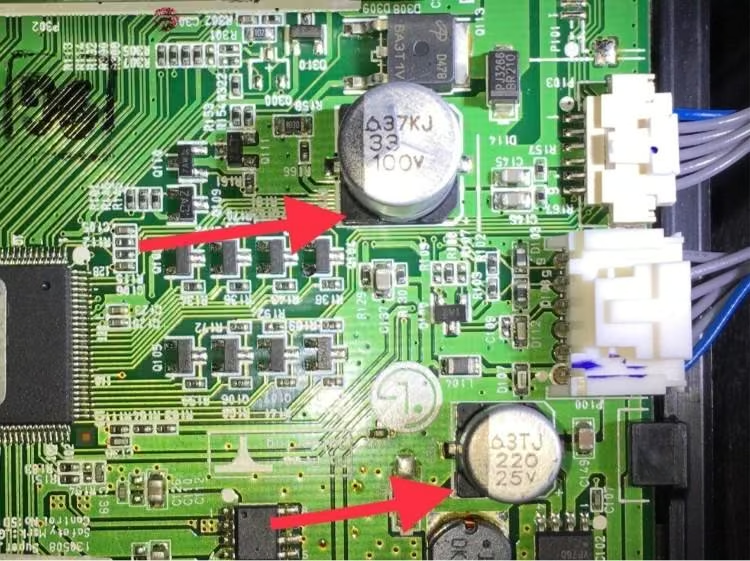
In electronics manufacturing, capacitors are among the most basic and most critical components on a printed circuit board. They act like the circuit’s “energy storage containers,” supporting functions such as filtering, coupling, bypassing, and voltage stabilization. In practical terms, almost every electronic device depends on them to operate properly.
Mounting a capacitor on a PCB may sound like a simple matter of placement and soldering, but in reality it involves the entire process—from design and component selection to assembly and inspection. Even a small mistake can lead to capacitor failure, circuit malfunction, or in the worst case, an entire batch of products being scrapped.
Many buyers, product managers, and even junior engineers think capacitor mounting simply means “put it on the board and solder it in place.” What often gets overlooked is that different capacitor types require different mounting methods, process controls, and risk management. Drawing on years of hands-on PCB assembly services experience, this article focuses on practical execution rather than abstract theory. The goal is to help you understand the full capacitor mounting process, the differences between common mounting scenarios, and the production issues that are easiest to get wrong.
First Things First: Why Do Capacitors Need to Be Mounted on a PCB?
A capacitor cannot perform its electrical function on its own. It has to be mounted onto a PCB and connected with other components—such as resistors, ICs, and connectors—to become part of a working circuit. The purpose of mounting is twofold. First, it creates the electrical connection that allows the capacitor to function inside the circuit. Second, it provides mechanical stability so the capacitor does not shift, loosen, or fall off during transport or long-term use.
Unlike some other components, capacitors vary widely in both type and package. They can range from tiny surface-mount capacitors only a few millimeters across to much larger through-hole electrolytic capacitors. Different capacitor sizes and constructions require very different assembly methods and process controls. That is also one of the most common reasons capacitor mounting goes wrong in real projects: the capacitor itself may be the right choice, but the mounting method is not.
Common Capacitor Types and Their Mounting Methods
The most important differences in capacitor mounting begin with the capacitor’s type and package. In actual production, the two main categories are surface-mount capacitors and through-hole capacitors. Their assembly logic and process requirements are very different. If we go one step further and look at materials such as ceramic, electrolytic, and tantalum capacitors, the practical differences become even clearer.
1. Surface-Mount Capacitors: The Main Choice for Volume Production
Surface-mount capacitors are the standard choice in consumer electronics, industrial controls, automotive electronics, and many other products. They are compact, leadless, and highly efficient for automated assembly, making them ideal for high-density PCB layouts.
Common examples include multilayer ceramic capacitors (MLCCs), surface-mount tantalum capacitors, and surface-mount electrolytic capacitors. Their basic mounting method is similar, although each type has its own process details.
Multilayer Ceramic Capacitors (MLCCs)
MLCCs are the most widely used surface-mount capacitors. Common package sizes range from very small 0201 parts all the way to 0805 and 1206. They are non-polarized, so orientation is not an issue during placement as long as the component aligns correctly with the pads.
In real production, MLCCs are typically installed using SMT assembly, which makes them well suited for high-volume manufacturing. They are also the most common capacitor type found on modern PCBs. One important note is that MLCCs are sensitive to mechanical stress. If the nozzle pressure is too high during pick-and-place, the capacitor body can crack.
Surface-Mount Tantalum Capacitors
Tantalum capacitors are polarized. The body usually includes a stripe or a plus sign that indicates the positive terminal. During assembly, that marking must align with the positive pad on the PCB. Reverse installation can cause overheating, swelling, or outright failure.
These capacitors are also mounted primarily with SMT processes and are commonly used in more demanding circuits, including industrial sensors and medical devices.
Surface-Mount Electrolytic Capacitors
Surface-mount electrolytic capacitors are physically larger than ceramic chip capacitors and are also polarized. A dark stripe on the body typically indicates the negative terminal. During placement, that polarity marking must match the PCB footprint.
These capacitors are commonly used in circuits that require relatively large capacitance for energy storage. When mounting them, it is important to leave enough thermal clearance and avoid placing them too close to hot-running components.
2. Through-Hole Capacitors: A Practical Option for Special Applications
Through-hole capacitors have metal leads that are inserted into plated holes in the PCB and then soldered in place. They are typically larger, offer higher capacitance, and provide stronger mechanical retention. That makes them a good fit for power applications and products that need greater physical robustness, such as industrial power supplies and heavy-duty filtering circuits.
The most common through-hole capacitors are electrolytic capacitors, along with some ceramic disc capacitors. During assembly, the leads are inserted into the corresponding through-holes in the PCB, with attention paid to polarity. In most cases, the longer lead is positive, the shorter lead is negative, and the striped side of the capacitor body indicates the negative terminal. After insertion, the leads may be bent slightly to hold the capacitor in place before soldering. The component is then secured by wave soldering or hand soldering, and the excess lead length is trimmed, usually leaving about 1 mm.
A detail that is easy to miss is that the lead bend angle should not be too aggressive. Excessive bending can crack the lead or create weak solder joints. It is also important to make sure the leads are fully inserted into the holes so the electrical connection is reliable.
A Quick Note on Package Priority
In real projects, the decision between surface-mount and through-hole capacitors usually depends on two things: PCB space and circuit requirements. High-density boards generally favor surface-mount components. Circuits that need large capacitance, high power handling, or strong mechanical stability often use through-hole capacitors. In today’s industry, the overall trend is clear: surface mount first, through-hole when necessary.
The Complete Capacitor Mounting Process on a PCB
Mounting a capacitor on a PCB is not just a matter of placing it and soldering it. It is a tightly linked process in which mistakes made during design can cause assembly problems later, and process issues during assembly can directly affect product quality.
Here is a practical breakdown of the full workflow.
1. PCB Design and Pad Layout: The Foundation of Successful Assembly
A lot of people underestimate how much capacitor mounting success depends on PCB design. Pad design, in particular, has a direct impact on solder joint quality and component stability.
The main rule is simple: the pads must match the capacitor package. If the pads are too large, the capacitor may shift or create solder bridges. If the pads are too small, weak solder joints or insufficient wetting may result. For through-hole capacitors, the pad hole diameter should generally be about 0.1 to 0.2 mm larger than the lead diameter so insertion is easy while still allowing the solder to properly wet the lead.
Layout also matters. Polarized capacitors should always have clear polarity markings on the PCB. Large capacitors, such as surface-mount electrolytics or through-hole parts, should preferably be located near the board edge or in areas with better heat dissipation. In high-density PCBs, spacing between capacitors should generally be at least 0.5 mm to reduce assembly interference and allow easier inspection.
2. Component Selection: Choose the Right Capacitor for the Circuit and the Process
Component selection should match both circuit needs and assembly requirements. High-frequency circuits often use ceramic capacitors because of their low parasitic inductance. Energy storage applications often call for electrolytic capacitors. Precision circuits that need low loss may favor tantalum capacitors.
One point that is often missed is process compatibility. For example, if you are building prototypes in small quantities, extremely small packages such as 0201 can make hand soldering difficult and increase the risk of damage. For larger production runs, standard packages such as 0805 and 1206 are usually easier to assemble with better yield. It is also important to source capacitors from reliable manufacturers so that hidden problems—such as poor tolerance control or incorrect polarity marking—do not show up after assembly.
3. Solder Paste Printing: A Critical Step for Surface-Mount Assembly
For surface-mount capacitors, solder paste printing is one of the most important steps before placement. Paste quality and printing accuracy directly affect solder joint reliability and can determine whether issues such as opens or bridges appear later.
In actual production, the solder paste should be matched to the process requirements. Paste viscosity and particle size must be appropriate for the stencil design and component size. If the paste is too thin, printing may be inconsistent. If it is too thick, residue and incomplete transfer may occur. The stencil aperture size should match the pad design, and the paste thickness is commonly controlled in the 0.1 to 0.15 mm range.
A practical tip: inspect the board immediately after printing. If you find insufficient paste, missing deposits, or bridging, clean the board and reprint it before it moves to the next process step. Many soldering defects can be traced back to poor paste printing.
4. Pick-and-Place: Accurate Positioning Matters
In volume production, surface-mount capacitors are placed with SMT pick-and-place equipment. The essential requirement is accurate positioning. The machine uses a vision system to identify board fiducials and component information, then picks the capacitor from tape and places it onto the correct pads.
Two process points matter most here. The first is nozzle selection. Different capacitor sizes require different nozzles. A nozzle that is too large can damage the part or reduce placement accuracy. The second is placement force. Too much force can crack MLCCs, while too little can cause poor seating and component movement during reflow.
For prototype work or rework, capacitors may be placed manually using tweezers or a vacuum pen. In that case, they should be positioned gently and accurately, with no excessive pressure and no suspended or tilted placement.
5. Reflow Soldering for Surface-Mount Capacitors and Wave Soldering for Through-Hole Capacitors
Soldering is the core step in capacitor mounting. Different capacitor types require different soldering methods, and the process settings have a direct impact on final quality.
Surface-mount capacitors are usually soldered by reflow. The assembled PCB passes through a reflow oven that follows a controlled thermal profile: preheat, soak, reflow, and cooling. Peak temperature depends on the solder paste but is often in the range of 220 to 240°C. Total heating time is commonly around three to five minutes. Excessive temperature or too much dwell time can damage heat-sensitive capacitors, especially electrolytic types.
Through-hole capacitors are commonly soldered by wave soldering. In that process, the board passes over a wave of molten solder that wets the leads and pads on the underside of the PCB. Typical wave soldering temperatures are around 260 to 280°C, with conveyor speed adjusted based on board thickness and thermal mass. If the exposure time is too long, lead oxidation may increase. If it is too short, insufficient wetting or weak joints may result.
When small and large capacitors are mixed on the same board, the thermal profile has to balance the heat tolerance of the smaller parts with the soldering needs of the larger ones.
6. Inspection and Testing: Catch Defects Before They Move Forward
Once soldering is complete, the board should go through inspection to catch assembly defects before the product moves on.
Three common inspection methods are widely used in production:
AOI (Automated Optical Inspection)
AOI uses cameras to inspect the board surface for defects such as misalignment, tombstoning, solder opens, and bridging. It is efficient for batch inspection and works well for visible surface defects.
X-Ray Inspection
For hidden joints or larger packages where internal solder quality cannot be verified optically, X-ray inspection can reveal internal voids, opens, or other defects that AOI cannot see.
Functional Testing
Functional testing verifies electrical performance under simulated working conditions. This can include checking whether the capacitor is operating correctly in the circuit and whether the overall board functions as expected.
Any defective boards found during inspection should be reworked promptly, with soldering temperature carefully controlled to avoid damaging the capacitor or the PCB pads during repair.
Key Design and Manufacturing Considerations
In actual production, a large percentage of capacitor mounting defects come from small details that are easy to overlook. Here are some of the most important ones.
1. Polarity: The Most Serious and Most Common Mistake
For polarized capacitors such as electrolytic and tantalum types, reversed installation can be catastrophic. It may lead to component failure, swelling, leakage, or even fire.
It is especially important to remember that polarity markings are not the same across capacitor types. On aluminum electrolytic capacitors, the stripe usually indicates the negative terminal. On tantalum capacitors, the marking generally indicates the positive terminal. This is a frequent source of mistakes.
PCB polarity markings should be clear, and polarity should be verified twice before placement, whether the board is assembled by machine or by hand.
2. Thermal Stress: Prevent Heat Damage
Capacitors are sensitive to temperature, especially electrolytic and tantalum capacitors. Excessive heat can degrade internal materials, shorten service life, or cause immediate failure.
During hand soldering, iron temperature should generally stay below 350°C, and soldering time per lead should be kept as short as possible, ideally under three seconds. During reflow, the thermal profile should follow the component’s temperature limits.
Capacitors should also be kept away from hot components on the board whenever possible, and through-hole electrolytic capacitors should not be mounted flush against areas of the PCB that may transfer excessive heat.
3. Mixed Capacitor Sizes Require Process Balancing
Many PCBs contain both very small chip capacitors and larger capacitors such as electrolytics or through-hole parts. In those cases, pick-and-place settings and thermal profiles should be adjusted carefully. Small capacitors are more vulnerable to cracking and tombstoning, while larger parts may need more thermal energy for good soldering.
4. High-Density Layouts Need Adequate Working Space
As electronics become smaller and denser, capacitor placement areas become tighter. That increases the risk of placement shifts, solder bridges, and difficult rework. Leaving adequate spacing between capacitors and between capacitors and neighboring components helps both assembly and later inspection.
Common Capacitor Mounting Problems and How to Fix Them
Even when the process is generally under control, defects can still happen. Here are some of the most common issues and their practical solutions.
1. Component Shift
This happens when the capacitor ends up off-center from its intended pad position. Common causes include uneven solder paste, incorrect placement pressure, poor board positioning, or solder paste that is too thin.
The solution is to review stencil printing quality, recalibrate the placement system, verify nozzle force, and make sure the PCB is properly supported if warpage is present.
2. Tombstoning
Tombstoning occurs when one end of a chip capacitor lifts off the pad during reflow. It is especially common with small packages.
Typical causes include asymmetric pad design, uneven solder paste volume, an overly aggressive reflow profile, or placement offset. Fixes include balancing the pad design, improving paste consistency, adjusting the reflow ramp rate, and recalibrating placement accuracy.
3. Poor Solder Joints
Cold joints, insufficient wetting, or weak solder connections can result from too little solder paste, low soldering temperature, short heating time, or oxidation on pads or leads.
Corrective action includes increasing paste consistency, reviewing the thermal profile, cleaning oxidized surfaces, and ensuring repaired joints are properly filled and wetted.
4. Reversed Polarity
This is most common with electrolytic and tantalum capacitors. Causes include unclear PCB markings, incorrect component library data in the placement machine, or operator error during manual assembly.
Solutions include improving silkscreen polarity markings, validating machine library data, double-checking polarity during manual placement, and confirming orientation during first article inspection.
5. Heat Damage
Overheating can cause swelling, leakage, or long-term performance degradation. It is usually caused by excessive soldering temperature, prolonged thermal exposure, poor layout around heat sources, or an improper reflow profile.
The fix is to stay within the capacitor’s temperature limits, optimize board layout, and choose higher-temperature-rated capacitors where needed.
Hand Soldering vs. SMT Assembly
A common question is whether capacitors should be installed by SMT assembly or by hand. The answer depends on production volume, capacitor type, and accuracy requirements.
SMT Assembly: The Best Option for Volume Production
SMT assembly uses automated equipment for both placement and soldering. It is the preferred method for high-volume production because it offers high speed, high accuracy, and strong consistency. It is especially well suited for small packages such as 0402, 0805, and 1206, as well as high-density PCB designs.
Its main limitation is setup cost. For very small prototype quantities, full SMT processing may not always be the most economical option.
Hand Soldering: A Practical Choice for Prototypes and Rework
Hand soldering is useful for small prototype runs, samples, repair work, or special capacitor types that are not practical for automated placement. It provides flexibility but depends heavily on operator skill.
The downside is lower efficiency and less consistency. It is easier to create soldering defects, placement shifts, or thermal damage when compared with a controlled SMT process.
A Practical Selection Rule
For volume production, tight tolerances, and small packages, SMT assembly should be the default choice. For low-volume prototyping, repair, or large through-hole capacitors, hand soldering is often more practical. In many real-world projects, manufacturers use a hybrid method: SMT for most surface-mount components and hand soldering for special parts or rework.
Why Professional PCBA Manufacturers Are Better Equipped for Capacitor Mounting
Some companies try to handle capacitor mounting in-house, but the results often include higher defect rates, lower efficiency, and more wasted cost. The issue is usually not that capacitor mounting is conceptually difficult. The challenge is that it requires a complete process system, specialized equipment, and strong quality control.
That is where a professional PCBA manufacturer has a clear advantage.
1. More Stable Process Control and Lower Defect Rates
A professional PCBA manufacturer operates with standardized process controls across solder paste printing, placement, reflow, and inspection. That makes it easier to reduce human error and improve consistency.
2. Higher Equipment Precision and Broader Process Capability
Capacitor mounting—especially for small packages and dense boards—requires precise SMT equipment, controlled reflow systems, and reliable inspection tools. A professional manufacturer is much more likely to have that level of capability.
3. End-to-End Quality Control
A capable PCBA manufacturer can control quality from incoming component inspection through first article verification, in-process inspection, final testing, and traceability. That reduces the chance of defective boards reaching the customer.
4. Better Cost Control and Higher Efficiency
Building an in-house SMT line requires significant investment in equipment, training, process tuning, and maintenance. For many companies, outsourcing to an established PCBA manufacturer provides better efficiency and lower total cost, especially when production volume changes over time.
5. Stronger Engineering Support
A professional PCBA manufacturer can also provide design-for-manufacturing feedback before production begins. That includes advice on capacitor selection, pad sizing, polarity marking, layout optimization, and process risk reduction. That kind of early support can prevent costly assembly issues later.
Final Thoughts: Capacitor Mounting Is All About Execution
Mounting capacitors on a PCB may look straightforward, but in practice it is a system-level task that depends on good design, proper component selection, controlled assembly, and reliable inspection. It does not require complicated theory, but it does require experience and discipline.
For buyers and product managers, understanding the capacitor mounting process helps with supplier selection and project control. For engineers, it helps reduce design risk and improve manufacturability. For manufacturers, working with a qualified PCBA partner helps lower defect rates, reduce cost, and improve long-term product reliability.
There is no single “best” capacitor mounting method for every project. The right answer depends on production volume, accuracy requirements, board density, and capacitor type. The key is choosing the method and the manufacturing partner that best fit the application so that every capacitor can do its job reliably and every product can perform as intended.
Related posts:
 Introduction to PCB Assembly Process
 HDI PCB Boards: All you need to know
 How to get most of Flex and Rigid-Flex PCBs?
 The PCB Assembly Procedure- Basic Information You Should Know
 The Various Applications Of Thin Films In Electronics And Other Equipment
 Mitigating Electromagnetic Interference (EMI) in PCB Designs
 How EBAC is Enhancing Microelectronics Resilience
 Charging and Discharging a Capacitor
 Thermistor Sensor: A Comprehensive Guide
 Analog and Logic ICs: The Essential Building Blocks of Modern Electronics