
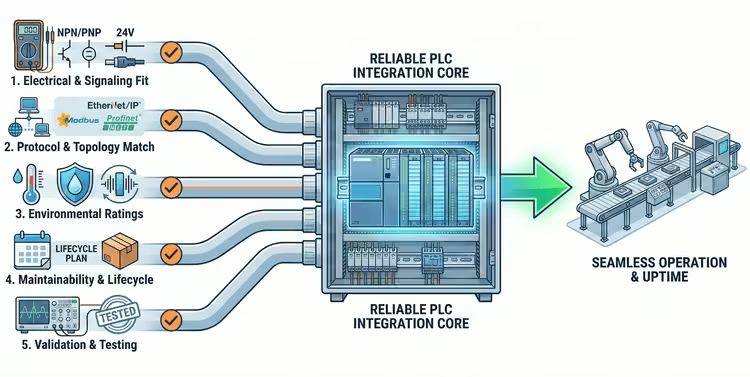
Industrial automation projects frequently encounter delays or operational instability not because of logic errors, but due to hardware incompatibility during the integration phase. Mismatched signal types, overlooked environmental constraints, or ignored lifecycle data can turn a routine cabinet build into a costly troubleshooting exercise.
Reliability in Programmable Logic Controller (PLC) systems begins at the component selection stage. By rigorously evaluating modules against specific technical criteria before procurement, engineers can eliminate common failure points. The following five practical tips focus on reducing integration risk, ensuring long-term maintainability, and streamlining the commissioning process.
Tip 1: Verify Electrical and Signaling Compatibility
Why It Matters
The most immediate cause of hardware integration failure is a mismatch in electrical characteristics between the field device, the automation module, and the PLC. Issues such as confusing sourcing (PNP) versus sinking (NPN) inputs, incompatible voltage levels, or insufficient isolation can lead to non-functioning I/O points or, in severe cases, permanent damage to the PLC backplane. A preliminary compatibility audit prevents the need for emergency rewiring or the addition of unplanned interposing relays during commissioning.
Practical Checklist
- Supply Voltage & Ripple: Confirm the module’s nominal voltage (e.g., 24VDC) matches the cabinet supply and verify its tolerance for voltage ripple to prevent brownouts.
- I/O Logic Type: Ensure digital inputs/outputs match the PLC card specifications (Sinking/NPN vs. Sourcing/PNP) to avoid wiring conflicts.
- Isolation & Immunity: Check for galvanic isolation ratings and transient immunity (surge, ESD) to protect sensitive logic from field noise.
- Signal Conditioning: Verify analog signal levels (0–10 V, 4–20 mA, RTD types) and check if built-in signal conditioning or external level-shifting is required.
Tip 2: Match Communication Protocols and Topologies
Key Considerations
In modern distributed control systems, protocol mismatch is a primary integration blocker. Whether utilizing Modbus RTU/TCP, EtherNet/IP, Profinet, or CANopen, it is critical to confirm that the candidate module supports the specific role (Master/Scanner or Slave/Adapter) required by the PLC. Furthermore, the physical network topology—whether star, ring (requiring redundancy protocols like DLR), or daisy-chain—must be supported by the module’s hardware ports to avoid the need for external switches.
Action Items
- Map PLC Capabilities: List the PLC’s supported protocols and specific requirements, such as support for explicit messaging or specific I/O mapping constraints.
- Verify Firmware: Confirm that the module’s shipping firmware version supports the desired protocol features and addressing limits.
- Request Evidence: When comparing vendors, view real product pages and spec sheets for tested industrial automation modules to confirm supported protocols and firmware notes.
- Check Gateway Needs: Determine if a protocol gateway is necessary to bridge disparate networks (e.g., converting Serial to Ethernet).
Tip 3: Specify Environmental and Mechanical Ratings
What to Check
Industrial environments are rarely pristine. Extreme temperatures, mechanical vibration, conductive dust, and corrosive agents can degrade standard electronic components rapidly. It is essential to select modules rated for the specific zone conditions rather than assuming a “one-size-fits-all” approach. Factors such as conformal coating for humidity protection, metal housings for EMI shielding, and positive-locking connectors for high-vibration areas are critical for longevity.
Quick Checklist
- Temperature Range: Verify both operating and storage temperature ratings meet the site’s extremes (e.g., -20°C to +70°C).
- Shock & Vibration: Check for certification (such as IEC 60068) if the module will be mounted on mobile equipment or near heavy machinery.
- Ingress Protection: Confirm the IP/NEMA rating matches the installation location (e.g., IP67 for washdown areas vs. IP20 for cabinet mounting).
- Mechanical Durability: Assess connector mating cycle durability and ensure adequate strain relief mechanisms are available.
Tip 4: Plan for Maintainability and Lifecycle
Why Lifecycle Planning Saves Downtime
The total cost of ownership is heavily influenced by how easily a system can be maintained and how long parts remain available. Obsolescence, long lead times, and proprietary configurations can extend outages from hours to weeks. Procurement decisions should factor in the manufacturer’s product lifecycle status (Active, Mature, End of Life) and the availability of technical support. Modular designs, where individual I/O slices can be hot-swapped without rewiring the main bus, significantly reduce Mean Time To Repair (MTTR).
Procurement Checklist
- Lifecycle Status: Confirm the manufacturer’s expected production timeline and inquiry about “Last Time Buy” policies.
- Spare Availability: Verify the existence of local stock or authorized distributors to ensure rapid spare parts delivery.
- Versioning Strategy: Prefer modules with clear hardware/firmware versioning and backward compatibility to avoid future integration headaches.
Tip 5: Validate with Testing—Bench, Integration, and Simulated Loads
Testing Stages
Relying solely on datasheets is a risk; validation requires empirical data. Before installation, engineers should conduct bench tests that simulate PLC scan times and verify timing under load. Testing should emulate worst-case scenarios, such as maximum network traffic, electrical noise, or full-load I/O switching, to reveal hidden weaknesses. Utilizing PLC simulation tools to drive the module through its logic states ensures that the hardware behaves predictably before it enters the critical path.
Practical Test Checklist
- Power-Up & Diagnostics: Verify correct startup behavior, indicator LED functionality, and error reporting capability.
- Throughput Stress Test: Subject the communication port to sustained messaging to check for dropped packets or latency spikes.
- Accuracy Verification: Measure analog inputs and outputs against calibrated standards under varying loads and temperatures.
- Recovery Testing: Simulate power loss and network disconnection to verify failover behavior and automatic recovery times.
Commissioning & Quick Integration Checklist
Pre-Site: Collect all datasheets, wiring diagrams, EDS/GSD files, and firmware images in a central repository.
On-Site: Confirm physical wiring integrity, label all terminals clearly, and perform a dedicated ground/earthing impedance check.
First-Run: Verify every I/O point individually in the PLC program (IO check), log initial values as a baseline, and schedule a 24-hour burn-in period if schedule permits.
Post-Publish: Document the final firmware versions and serial numbers for the maintenance team’s spares ordering log.
FAQ
Q: How many modules should I prototype before final buying?
A: Prototype with at least one full functional set (including I/O, comms, and power) and one spare to validate interchangeability. Expand testing to critical subsystems before committing to a bulk purchase.
Q: Is it OK to mix brands on the same network?
A: Yes, provided they share the exact protocol and timing constraints. However, thorough testing is required, as different implementations may handle timeouts, retransmissions, and error flags differently.
Q: What is the single biggest oversight in module selection?
A: Ignoring lifecycle status and spare availability. It is inexpensive to buy a spare module during the initial install, but incredibly costly to wait for an obsolete part during unplanned downtime.
Q: Do I always need industrial-grade modules?
A: If the environment involves temperature extremes, vibration, or strict uptime requirements, yes. For controlled lab environments, standard commercial modules may suffice if protected by proper enclosures.
Conclusion
Reliable PLC integration is rarely an accident; it is the result of deliberate selection and rigorous testing. By prioritizing electrical fit, communication compatibility, environmental suitability, lifecycle management, and hands-on validation, engineers can build robust automation systems that stand the test of time. Use the checklists provided above during your next vendor evaluation to ensure that your procurement choices lead to a seamless installation.
Related posts:
 How to Source Hard-to-Find Electronic Components for Legacy Automation Systems
 Open Loop and Closed Loop Control System (4 Practical Examples Included)
 Things You Should Know About Electromagnetic Flow Meters
 The Basics of Programmable Logic Controller (PLC) that You Never Learned
 Sinusoids and Phasors: Complete Guide
 What is CNC Machining? | Definition, Processes, Components & More
 Here is Why Your Equipment Needs Solenoid Valves
 Time Domain Analysis vs Frequency Domain Analysis
 Advancements in Industrial Automation with ASCO Solenoid Valves
 Selecting the Right Servo Drive: 12 Critical Factors for Engineers