
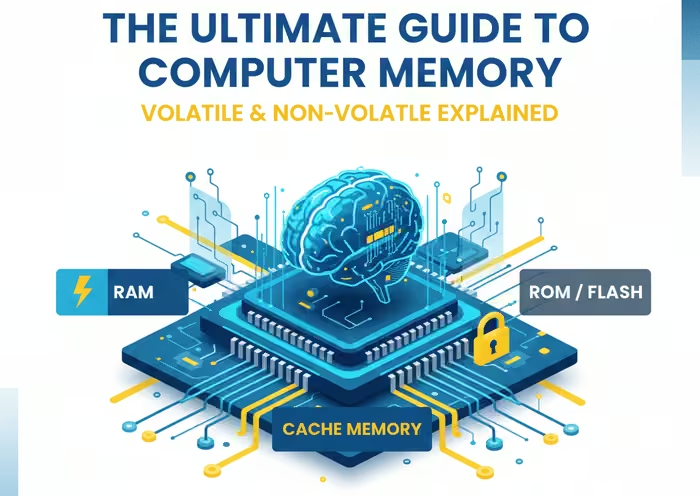
In the digital age, we’re surrounded by devices that rely on a fundamental component: memory. From the powerful servers that host our websites to the smartphones in our pockets, memory is the unsung hero that enables our technology to function. But what exactly is computer memory, and how does it work? This comprehensive guide will delve into the intricacies of computer memory, exploring its various types, its crucial role in system performance for your needs.
What is Computer Memory?
At its core, computer memory refers to the electronic components that store data and instructions for immediate use by a computer’s processor. Think of it as a computer’s short-term workspace, where it keeps the information it needs to perform tasks quickly and efficiently. This is distinct from storage, such as a hard drive or solid-state drive, which is used for long-term data retention.
Memory is essential for a computer’s operation. Without it, the processor would have to retrieve data directly from the much slower storage drive every time it needed to perform a task, resulting in a significant decrease in performance. The term “memory” is often used interchangeably with Random Access Memory (RAM), but as we’ll see, there are several different types of memory, each with its own unique characteristics and functions.
The Two Main Categories of Memory: Volatile and Non-Volatile
All computer memory can be broadly categorized into two main types: volatile and non-volatile.
- Volatile Memory: This type of memory requires a constant power supply to retain the information stored on it. Once the power is turned off, all the data is lost. The most common example of volatile memory is RAM. Its primary advantage is its speed, which is why it’s used for actively running programs and processing data.
- Non-Volatile Memory: In contrast, non-volatile memory can hold onto data even when the power is turned off. This makes it ideal for long-term storage of information that needs to be preserved. Examples of non-volatile memory include Read-Only Memory (ROM), flash memory, and storage devices like hard drives and SSDs.
A Deep Dive into the Types of Computer Memory
Now that we have a basic understanding of the two main categories, let’s explore the specific types of computer memory in more detail.
1. Random Access Memory (RAM)
RAM is the most well-known type of computer memory and is a form of volatile memory. It’s called “random access” because the processor can access any part of the memory directly, without having to go through the data in a sequential order. This allows for incredibly fast data retrieval and is essential for multitasking and running demanding applications. The more RAM a computer has, the more programs it can run simultaneously without slowing down.
There are two primary types of RAM:
- Dynamic RAM (DRAM): This is the most common type of RAM used in personal computers and servers. DRAM stores each bit of data in a separate capacitor within an integrated circuit. However, these capacitors leak charge over time, so they need to be constantly refreshed with power to maintain the data. This is why it’s called “dynamic.” While this refreshing process adds a slight overhead, DRAM is denser and less expensive to manufacture than SRAM, making it ideal for main system memory.
- Static RAM (SRAM): SRAM is faster and more reliable than DRAM because it doesn’t need to be refreshed. It uses a more complex six-transistor circuit to store each bit of data. This complexity makes SRAM more expensive and less dense than DRAM, which is why it’s not used for the main system memory. Instead, SRAM is primarily used for the CPU’s cache memory, a small, high-speed memory buffer that stores frequently accessed data for even faster retrieval by the processor.
2. Read-Only Memory (ROM)
ROM is a type of non-volatile memory that, as the name suggests, is designed to be read from but not written to. The data on a ROM chip is permanently etched into it during the manufacturing process and cannot be changed. This makes it ideal for storing the firmware of a computer, such as the BIOS (Basic Input/Output System), which contains the instructions needed to start up the computer.
Over the years, several variations of ROM have been developed:
- Programmable Read-Only Memory (PROM): PROM chips are manufactured as blank slates and can be programmed once by the user with a special tool. However, once programmed, the data cannot be erased or changed.
- Erasable Programmable Read-Only Memory (EPROM): EPROM chips can be erased and reprogrammed multiple times. To erase the data, the chip needs to be exposed to a strong ultraviolet light.
- Electrically Erasable Programmable Read-Only Memory (EEPROM): EEPROM is an advancement on EPROM that allows the data to be erased and reprogrammed electrically, without the need for ultraviolet light. This makes it much more convenient to update the firmware on devices. Flash memory, which we’ll discuss next, is a type of EEPROM.
3. Flash Memory
Flash memory is a type of non-volatile memory that has become ubiquitous in modern electronics. It’s a form of EEPROM that is faster and more durable. Flash memory is used in a wide range of devices, including USB drives, memory cards, and solid-state drives (SSDs). It offers a good balance of speed, durability, and cost-effectiveness, making it a versatile storage solution.
4. Cache Memory
Cache memory is a small, high-speed volatile memory that is located on or near the CPU. It’s designed to store frequently accessed data and instructions from the main RAM, allowing the CPU to retrieve them much faster than it could from the main memory. This significantly improves the overall performance of the system. There are typically multiple levels of cache (L1, L2, and L3), with L1 being the fastest and smallest, and L3 being the slowest and largest.
The Importance of Memory for System Performance
The amount and type of memory in a computer have a direct impact on its performance. Here’s why:
- Multitasking: The more RAM a computer has, the more applications it can run simultaneously without becoming sluggish. When you open multiple programs, each one takes up a portion of the RAM. If you don’t have enough RAM, the system will start to use a portion of the hard drive as “virtual memory,” which is much slower and can significantly degrade performance.
- Speed: The speed of the RAM, measured in megahertz (MHz), also affects performance. Faster RAM allows the processor to access data more quickly, which can lead to a more responsive system, especially in demanding tasks like gaming and video editing.
- Responsiveness: A sufficient amount of RAM ensures that the operating system and applications can load quickly and run smoothly. When the system has to constantly swap data between the RAM and the slower storage drive, it can lead to a noticeable lag in responsiveness.
Choosing the Right Memory Products
With so many different types of memory available, it’s important to choose the right products for your specific needs. Whether you’re building a new computer, upgrading an existing one, or designing an electronic device, you’ll need to consider factors such as the type of memory required, the capacity, the speed, and the form factor.
For those in search of a wide selection of memory components, a reliable electronic components distributor is essential. You can find a vast array of memory products, including various types of RAM, ROM, and flash memory, to suit any application.
The Future of Memory
The world of computer memory is constantly evolving. Researchers and engineers are continually working to develop new memory technologies that are faster, more efficient, and more durable. Some of the emerging technologies include:
- Resistive RAM (RRAM): RRAM is a non-volatile memory technology that has the potential to be much faster and denser than current flash memory.
- Magnetoresistive RAM (MRAM): MRAM is another non-volatile memory technology that uses magnetic storage elements to store data. It offers high speed, low power consumption, and virtually unlimited endurance.
- 3D XPoint: This technology, developed by Intel and Micron, is a type of non-volatile memory that is faster and more durable than NAND flash memory, but slower and less expensive than DRAM. It’s designed to bridge the gap between memory and storage.
Conclusion
Computer memory is a fundamental component of modern technology, and understanding its different types and functions is essential for anyone interested in how computers and electronic devices work. From the lightning-fast SRAM in the CPU cache to the ubiquitous flash memory in our smartphones, each type of memory plays a crucial role in enabling the digital world we live in. As technology continues to advance, we can expect to see even more innovative memory solutions that will push the boundaries of what’s possible.
Related posts:
 Miniature cells and Batteries – Silver Oxide, Mercury and Lithium Cells
 FPGA vs. GPU vs. CPU vs. ASIC: Differences Between Them
 Open Loop and Closed Loop Control System (4 Practical Examples Included)
 Beginner Friendly Kits That Most Newbie Used In Electronics
 Introduction to PCB Assembly Process
 FPGA for Beginners: Definition, Landscape and Glossary
 How Can I Find Work in FPGA?
 Top Educational Resources and Software for Understanding Electrical Machines
 Thermistor Sensor: A Comprehensive Guide
 How EBAC is Enhancing Microelectronics Resilience